

120 lines
No EOL
3.6 KiB
Markdown
120 lines
No EOL
3.6 KiB
Markdown
# ntfy emergency
|
|
|
|
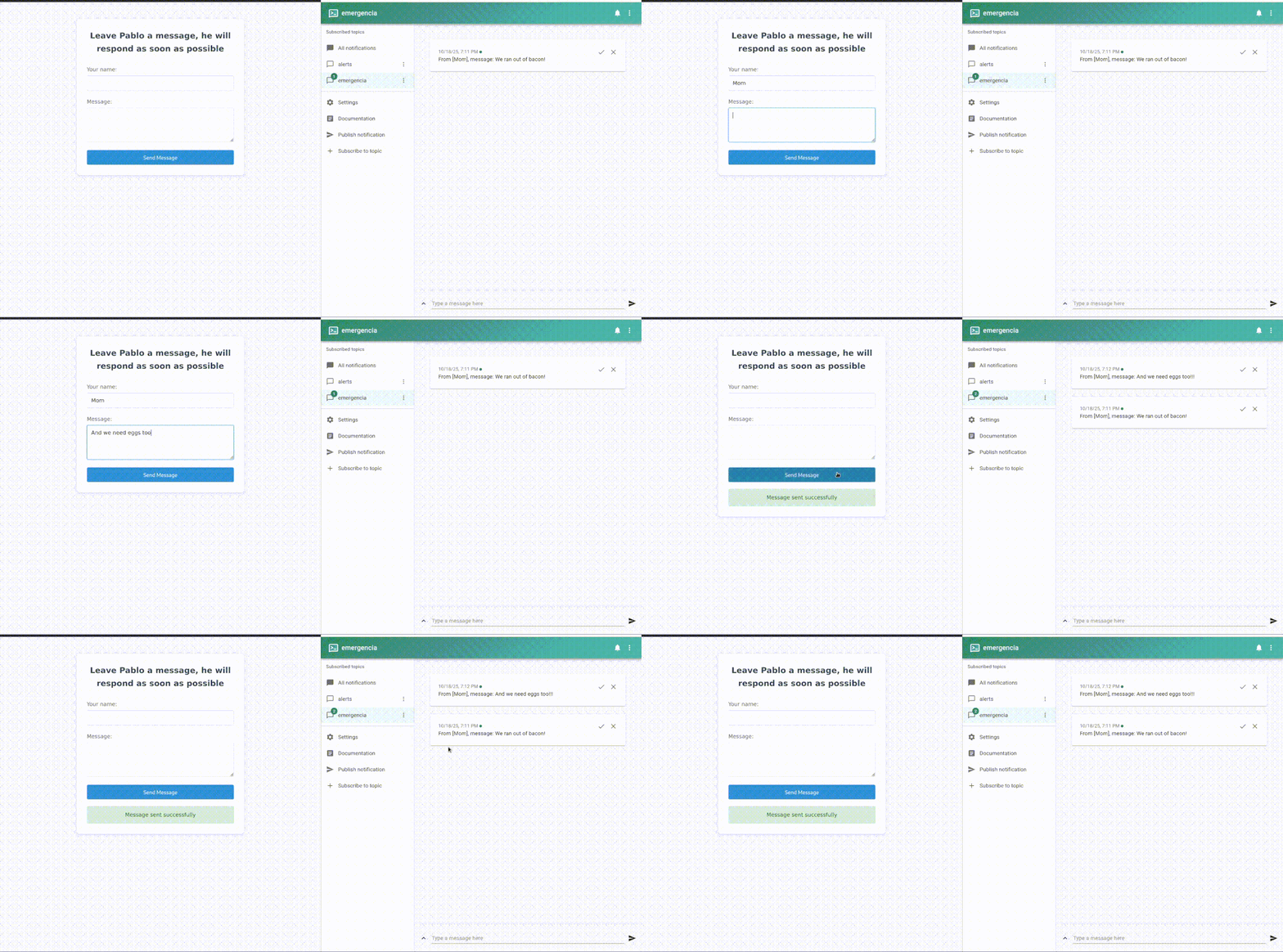
This is a simple web application that allows users to send emergency messages to a ntfy server and topic. No coding, no curl, no HTTP. Just a plain web form.
|
|
|
|
tldr: I look at messaging apps very infrequently and have no notifications for them. But what happens if there's a real emergency and someone needs to grab my attention? The only app in my phone that has notifications is the ntfy client, which I use to monitor servers and services. Why not receive a ntfy alert? This small webapp lets my trusted ones send me a high priority message if needed.
|
|
|
|
A gif is worth a thousand words:
|
|
|
|
[](https://postimg.cc/KKwtzjy3)
|
|
|
|
More details:
|
|
- You can deploy in a single `docker run`, simply passing the ntfy details through env vars.
|
|
- You can use it with both the official ntfy instance or with a selfhosted instance of your own.
|
|
- Deals with ntfy username/password auth if needed.
|
|
- No auth or spam protection: either roll your own, or simply pray nobody spams you.
|
|
|
|
|
|
## Dev setup
|
|
|
|
1. Install dependencies:
|
|
|
|
```bash
|
|
npm install
|
|
```
|
|
|
|
2. Configure environment variables:
|
|
```bash
|
|
cp env.example .env
|
|
# Edit .env with your values
|
|
```
|
|
|
|
3. Run the application:
|
|
```bash
|
|
npm start
|
|
```
|
|
|
|
## Environment Variables in detail
|
|
|
|
- `NTFY_TOPIC`: ntfy topic/channel to send messages to (required)
|
|
- `NTFY_URL`: URL of your ntfy server (optional, defaults to https://ntfy.sh)
|
|
- `NTFY_USER`: Username for ntfy authentication (optional, only needed for auth protected topics)
|
|
- `NTFY_PASSWORD`: Password for ntfy authentication (optional, only needed for auth protected topics)
|
|
- `PORT`: Port to run the application on (optional, defaults to 3000)
|
|
- `UI_MESSAGE`: Custom message to display in the UI (optional, defaults to "Emergency Message")
|
|
|
|
### Docker Registry Variables (Optional, needed to push to private registry)
|
|
|
|
Note that we assume that you `docker` cli is authenticated for the registry you want to use.
|
|
|
|
- `DOCKER_REGISTRY`: Custom registry to publish the image to (optional)
|
|
- `DOCKER_USERNAME`: Username/organization in the registry (optional)
|
|
- `DOCKER_TAG`: Tag for the Docker image (optional, defaults to "latest")
|
|
|
|
## Deployment
|
|
|
|
### Option 1: Docker Run
|
|
|
|
Run with Docker, passing environment variables directly:
|
|
```bash
|
|
docker run -d \
|
|
--name ntfy-emergency-app \
|
|
-p 3000:3000 \
|
|
-e NTFY_TOPIC=emergencia \
|
|
-e UI_MESSAGE="Send an emergency message" \
|
|
ghcr.io/pmartincalvo/ntfy-emergency-app:latest
|
|
```
|
|
|
|
For private ntfy servers with authentication:
|
|
```bash
|
|
docker run -d \
|
|
--name ntfy-emergency-app \
|
|
-p 3000:3000 \
|
|
-e NTFY_TOPIC=emergencia \
|
|
-e NTFY_URL=https://your-ntfy-server.com \
|
|
-e NTFY_USER=your-username \
|
|
-e NTFY_PASSWORD=your-password \
|
|
-e UI_MESSAGE="Send an emergency message" \
|
|
ghcr.io/pmartincalvo/ntfy-emergency-app:latest
|
|
```
|
|
|
|
The application will be available at `http://localhost:3000`
|
|
|
|
### Option 2: Direct Installation
|
|
|
|
1. Upload files to the server
|
|
2. Install Node.js (version 14 or higher)
|
|
3. Create a `.env` file with your credentials:
|
|
```bash
|
|
NTFY_TOPIC=emergencia
|
|
UI_MESSAGE=Send an emergency message
|
|
# Optional: only needed for private ntfy servers
|
|
# NTFY_URL=https://your-ntfy-server.com
|
|
# NTFY_USER=your-username
|
|
# NTFY_PASSWORD=your-password
|
|
```
|
|
4. Install dependencies:
|
|
```bash
|
|
npm install
|
|
```
|
|
5. Start the application:
|
|
```bash
|
|
npm start
|
|
```
|
|
|
|
### Reverse proxy
|
|
|
|
You probably want to put a reverse proxy in front of this. With [caddy](https://caddyserver.com/), assuming it runs on the same box, this would suffice:
|
|
|
|
```
|
|
emergency.yourdomain.com {
|
|
reverse_proxy localhost:3000
|
|
}
|
|
```
|
|
|
|
|
|
## Docker Image Publishing
|
|
|
|
```bash
|
|
npm run docker:build-tag-push
|
|
``` |