66 lines
4.2 KiB
Markdown
66 lines
4.2 KiB
Markdown

|
|
||
|
|
## Tab 1
|
||
|
|
|
||
|
|
- Tab title: Intro
|
||
|
|
- Main title: Get ready to receive your first Bitcoin
|
||
|
|
- Body:
|
||
|
|
In Bisq Easy, the Bitcoin you receive goes straight to your pocket without any intermediaries. That's a great advantage, but it also means you need to have a wallet that you control yourself to receive it!
|
||
|
|
|
||
|
|
In this quick wallet guide, we will show you in a few simple steps how you can create a simple wallet. With it, you will be able to receive and store your freshly purchased bitcoin.
|
||
|
|
|
||
|
|
If you are already familiar with on-chain wallets and have one, you can skip this guide and simply use your wallet.
|
||
|
|
|
||
|
|
|
||
|
|
## Tab 2
|
||
|
|
|
||
|
|
- Tab title: Download
|
||
|
|
- Main title: Downloading your wallet
|
||
|
|
- Body:
|
||
|
|
There are many wallets out there that you can use. In this guide, we will show you how to use Bluewallet. Bluewallet is great and, at the same time, very simple, and you can use it to receive your bitcoin from Bisq Easy.
|
||
|
|
|
||
|
|
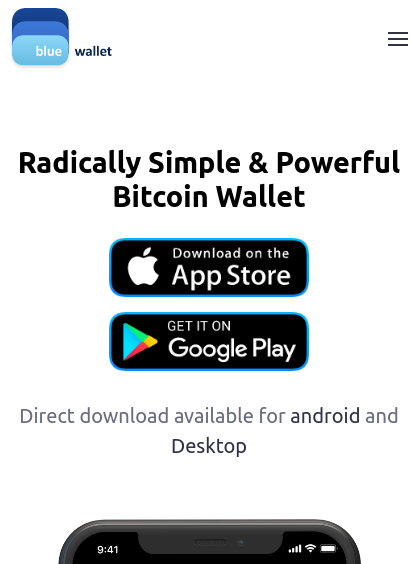
You can download Bluewallet on your phone, regardless of whether you have an Android or iOS device. To do so, you can visit the official webpage at bluewallet.io. Once you are there, click on App Store or Google Play depending on the device you are using.
|
||
|
|
|
||
|
|
[](https://postimg.cc/34H4JV0f)
|
||
|
|
|
||
|
|
**An important note:** for your safety, make sure that you download the app from the official app store of your device. The official app is provided by 'Bluewallet Services, S.R.L.', and you should be able to see this in your app store. Downloading a malicious copycat could put your funds at risk.
|
||
|
|
|
||
|
|
|
||
|
|
- Bottom link:
|
||
|
|
- Text: Click here to visit Bluewallet's page
|
||
|
|
- Link: https://bluewallet.io/
|
||
|
|
|
||
|
|
|
||
|
|
## Tab 3
|
||
|
|
|
||
|
|
- Tab title: New wallet
|
||
|
|
- Main title: Creating your new wallet
|
||
|
|
- Body:
|
||
|
|
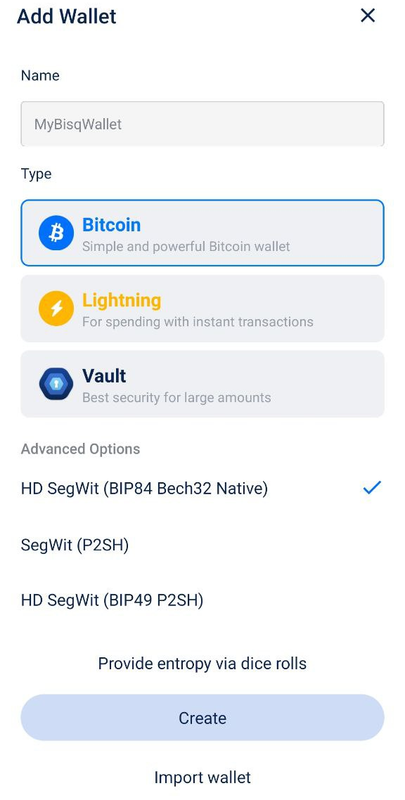
Bluewallet allows you to create several wallets for different purposes. For now, you only need to have one wallet. Once you enter Bluewallet, you will see a message suggesting you add a new wallet. Once you do that, enter a name for your wallet and pick the option *Bitcoin* under the *Type* section. You can leave all other options as they appear and click on *Create*.
|
||
|
|
|
||
|
|
[](https://postimg.cc/V0Nwr2Ts)
|
||
|
|
|
||
|
|
When you move to the next step, you will be presented with 12 words. These 12 words are the backup that allows you to recover your wallet if something happens to your phone. Write them down on a piece of paper (not digitally) in the same order in which they are presented, store this paper safely and make sure only you have access to it. You can read more about how to secure your wallet in the Learn sections of Bisq 2 dedicated to wallets and security.
|
||
|
|
|
||
|
|
Once you are done, click on *Ok, I wrote it down*. Congratulations! You have created your wallet! Let's move on to how to receive your bitcoin in it.
|
||
|
|
|
||
|
|
|
||
|
|
## Tab 4
|
||
|
|
|
||
|
|
- Tab title: Receiving
|
||
|
|
- Main title: Receiving bitcoin in your wallet
|
||
|
|
- Body:
|
||
|
|
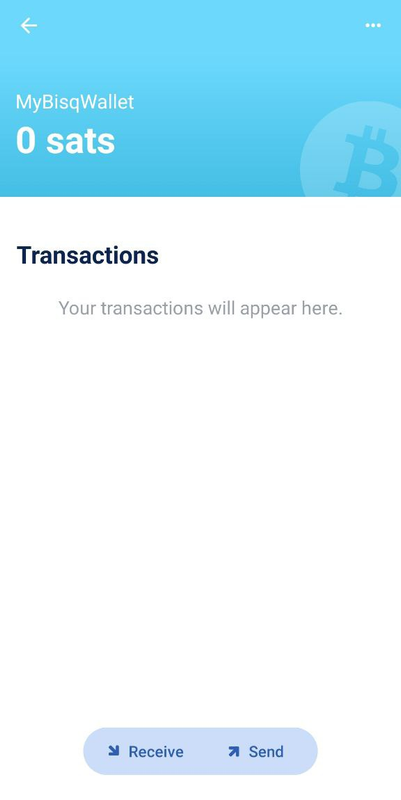
To receive your Bitcoin, you are going to need to obtain an address from your wallet. To do so, click on your newly created wallet, and afterwards click on the Receive button at the bottom of the screen.
|
||
|
|
|
||
|
|
[](https://postimg.cc/Mn06nkKR)
|
||
|
|
|
||
|
|
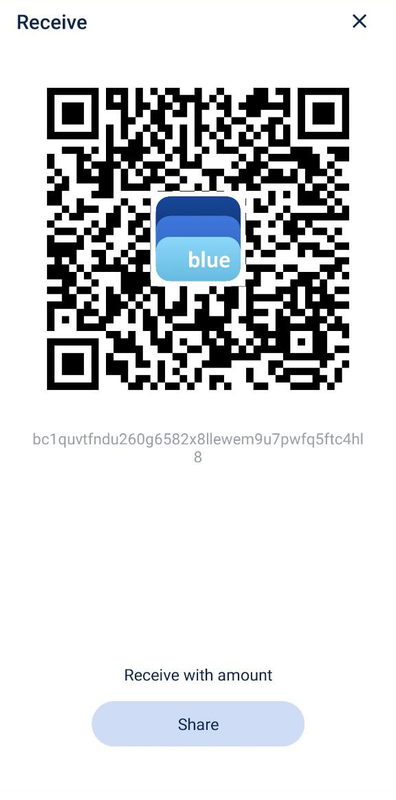
Bluewallet will display an address of your wallet, both as a QR code and as a chain of letters and numbers. This address is what you will need to provide in Bisq Easy to your peer so that he can send you the Bitcoin you are buying. You can move the address to your laptop by scanning the QR code with your laptop's camera, by sending the address with an email or chat message, or even simply by typing it directly into your laptop.
|
||
|
|
|
||
|
|
[](https://postimg.cc/JDsCcSmp)
|
||
|
|
|
||
|
|
Once you complete the trade, Bluewallet will notice the incoming Bitcoin and update your balance with the new funds. As you do more trades, you can and should always get a new address for each to protect your privacy.
|
||
|
|
|
||
|
|
These are the basics you need to know to start receiving Bitcoin in your own wallet. If you want to learn more about Bluewallet, we recommend checking out the videos listed below.
|
||
|
|
|
||
|
|
# Links
|
||
|
|
- Bluewallet with BTC Sessions: https://www.youtube.com/watch?v=imMX7i4qpmg&list=PLxdf8G0kzsUUE7HHNTGTWBFxzt2oudiyS&index=3
|
||
|
|
- Bluewallet with Anita Posch: https://www.youtube.com/watch?v=NqY3wBhloH4
|